VoIP video conferencing combines internet-based voice calling with live video so teams can meet, speak, share screens, and collaborate from different locations through one digital connection. Instead of using traditional phone lines for audio, the system carries voice and video as data over an IP network.
For businesses, this creates a flexible way to connect remote employees, customers, partners, and branch offices. Modern platforms can combine calling, video meetings, messaging, screen sharing, and other collaboration tools in one communication environment, making VoIP video conferencing an important part of unified business communications.
What Is VoIP Video Conferencing?
VoIP video conferencing is a communication method that uses Voice over Internet Protocol for audio while transmitting video over the same internet-based network. VoIP handles the voice portion of the meeting, while the video system manages the visual stream. Both are synchronized so participants can hear and see each other in real time.
Users can usually join from a laptop, desktop computer, smartphone, tablet, or conference room system. Depending on the platform, they may also be able to share screens, exchange messages, record meetings, invite external participants, or join by phone.
In real estate, the faster a team responds to a new inquiry, the better its chances of keeping that prospect engaged. Buyers often search for properties in the evening or on weekends, and many expect a quick response rather than waiting until the next business day. Research also suggests that leads contacted within five minutes are significantly more likely to convert than those reached 30 minutes later, making 24/7 responsiveness difficult for teams relying only on human agents.
An AI voice agent for real estate helps close this response gap by answering or calling leads, qualifying buyers and sellers, scheduling appointments, updating the CRM, and routing high-intent prospects to a human agent.
According to the National Association of REALTORS (NAR), 23% of REALTORS now use AI tools daily, while 55% say AI has had a positive impact on their real estate business.
Used correctly, voice AI does not replace the relationship side of real estate. It automates repetitive first-touch work so agents can focus on showings, negotiations, follow-up, and closing.
Key Takeaways
AI voice agents help real estate teams respond to and qualify leads faster.
They can automate scheduling, CRM updates, and follow-up.
The best solutions combine natural conversations, integrations, analytics, and human handoff.
ROI should be tracked through response time, qualified leads, appointments, and missed-call reduction.
AI works best alongside human agents, not as a replacement.
What Is an AI Voice Agent for Real Estate?
An AI voice agent for real estate is a conversational system that speaks with buyers, sellers, renters, and prospects over the phone using natural language. It can understand questions, collect information, follow qualification logic, trigger actions, and hand conversations to a human when needed.
How Do AI Voice Agents Work in Real Estate?
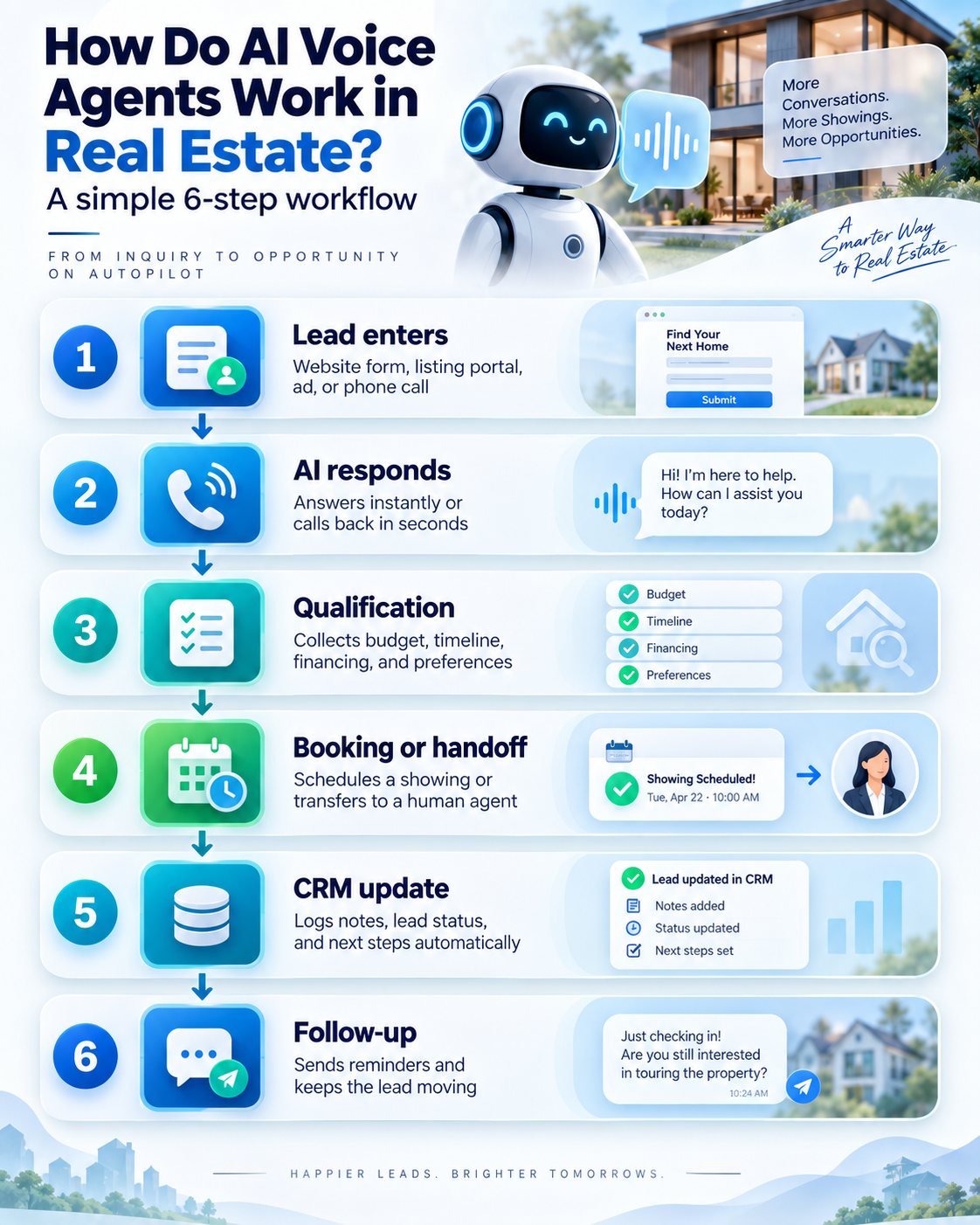
A typical workflow looks like this:
When a new inquiry enters the system, an AI voice agent for real estate can answer the inbound call or trigger an outbound call. The conversation then changes according to the lead type.
For a buyer, the system may ask about budget, financing status, location, property preferences, and timeline. For a seller, it may ask about the property, motivation, condition, expected timeline, and preferred next step.
After the call, the outcome can be sent to the CRM so the lead can be scored, assigned, scheduled, or placed into a follow-up sequence.
6 Ways AI Voice Agents Help Real Estate Teams
1. Respond to New Leads Immediately
Speed matters when several agents may be competing for the same inquiry. An AI voice agent for real estate can engage new leads without waiting for an available team member, including during evenings, weekends, or periods of high call volume.
2. Qualify Buyers and Sellers Automatically
The AI can consistently ask the questions your team needs before a human agent invests time in the lead.
For buyers, this may include:
Budget or price range
Financing or pre-approval status
Preferred location
Property type and must-have features
Buying timeline
For sellers, it may include:
Property details
Reason for selling
Property condition
Desired timeline
Preferred next step
Separate buyer and seller flows keep conversations relevant.
3. Book Property Showings and Appointments
When connected to a calendar, a voice agent can help schedule consultations, property tours, listing appointments, or callbacks. Instead of ending with “someone will contact you,” the system can move qualified prospects directly to the next action.
4. Handle After-Hours and Overflow Calls
An AI voice agent for real estate can provide coverage when the team is unavailable or when call volume increases. Complex questions, negotiations, legal issues, and sensitive situations should still be escalated to a qualified human.
5. Sync Conversations With Your CRM
A connected AI system can send lead details, call summaries, qualification status, and next steps into the CRM. VoxSun supports CRM integrations including Salesforce, HubSpot, and Zoho, helping teams keep call activity connected with the rest of the sales workflow.
6. Route High-Intent Leads to Human Agents
Good automation should know when to stop. If a prospect is ready to book, requests a human, asks a complex question, or meets priority criteria, the system should transfer or escalate the conversation with context.
The strongest workflow is usually AI for speed and repetition, with humans handling trust, advice, negotiation, and closing.
How Does an AI Voice Agent Qualify Real Estate Leads?
An AI voice agent for real estate can qualify leads through structured questions while adapting to each response.
Buyer Qualification
For buyers, it can collect budget, financing readiness, target area, property preferences, and timeline. A pre-approved buyer who plans to move soon may be routed differently from someone who is only researching.
Seller Qualification
Seller conversations need a different flow. The AI can collect property information, reason for selling, condition, timeline, and whether the seller is ready for a valuation or consultation.
Lead Scoring and Routing
There is no universal scoring formula. Brokerages should define criteria based on their market, inventory, lead sources, transaction value, and sales process.
High-intent leads can be routed immediately, while lower-intent leads can enter nurturing workflows until their needs or timing change.
What Makes the Best AI Voice Agent for Real Estate?
The best AI voice agent for real estate should fit your lead sources, CRM, call volume, markets, qualification process, and human handoff rules.
Capability
Why It Matters
Natural conversation
Makes calls easier for prospects to use
Fast response
Shortens the gap between inquiry and contact
CRM integration
Keeps lead data synchronized
Calendar integration
Supports booking and rescheduling
Buyer and seller workflows
Keeps qualification relevant
Human handoff
Escalates complex or high-value conversations
Multilingual support
Helps teams serve more markets
Analytics
Tracks call and conversion performance
Compliance controls
Supports responsible calling workflows
Reliable telephony
Protects call quality and customer experience
When comparing the best AI voice agent for real estate options, evaluate how the technology performs during real conversations and how well it connects with your existing workflow, rather than judging it only by a polished demo.
What ROI Can an AI Voice Agent Deliver for Real Estate?
The ROI of an AI voice agent for real estate usually comes from improving how existing leads are handled rather than simply generating more leads.
Fewer missed opportunities: More inquiries receive a response instead of waiting for a callback.
Faster engagement: Leads can be contacted while their intent is still high.
Consistent qualification: Every prospect can follow the same qualification framework.
Less repetitive work: Agents spend less time on screening, scheduling, and manual data entry.
More appointment opportunities: Qualified prospects can move directly from conversation to booking.
Metrics Real Estate Teams Should Track
To understand whether voice automation is producing value, measure:
Lead response time
Contact rate
Qualified lead rate
Lead-to-appointment rate
Appointment-to-close rate
Cost per qualified lead
Missed-call rate
Human handoff rate
CRM sync success rate
The goal is not to chase one impressive metric. Instead, look at whether automation improves the complete path from inquiry to qualified conversation, appointment, and revenue.
AI Voice Agents vs Human Real Estate Agents
AI and human agents are strongest at different stages of the customer journey.
AI Voice Agent
Human Agent
Immediate first response
Relationship building
Repetitive qualification
Complex qualification
After-hours coverage
Negotiations
Appointment scheduling
Personalized advice
CRM data capture
Deal strategy
Routine FAQs
Complex property discussions
An AI voice agent works best as the first layer of the sales process, not as a substitute for the professional guiding the client through a major transaction.
How to Implement AI Voice Automation in Real Estate?
Start With One Workflow
Begin with a clear use case such as new buyer inquiries, after-hours calls, seller qualification, or appointment booking. Starting with one defined workflow also makes it easier to measure performance before expanding automation across more parts of the business.
Connect Your CRM and Calendar
Define what information the AI can access, what it should write back to the CRM, and what actions should happen after each conversation. A connected workflow prevents agents from having to manually transfer information between systems.
Build Separate Conversation Paths
Buyers, sellers, renters, and investors may require different questions and routing rules. A generic script can make conversations feel irrelevant. Separate flows allow the system to collect information that actually matters for each type of prospect.
Define Human Handoff Rules
Set clear conditions for transfer, escalation, or urgent callbacks.
For example, a lead may need human attention when they request an agent directly, have a complex property question, show strong purchase intent, or enter a negotiation-related conversation.
Test and Optimize
Review calls, transcripts, missed intents, lead outcomes, booking rates, and customer feedback.
The goal is not to create a conversation flow once and leave it unchanged. Continue refining questions and routing rules as you learn where prospects need clearer answers or where valuable information is being missed.
Final Thoughts
An AI voice agent for real estate can help teams respond faster, qualify leads more consistently, automate scheduling, and reduce manual CRM work. The greatest value comes when the technology is connected to a clear sales workflow and knows when to hand the conversation to a human.
VoxSun combines business communications, CRM connectivity, and AI voice capabilities designed to help real estate teams move leads from first contact to the next action more efficiently.
Frequently Asked Questions
Can an AI voice agent qualify real estate leads?
Yes. It can ask structured questions about budget, timeline, financing, property needs, motivation, and readiness, then route the lead according to your qualification rules.
Can AI voice agents book property showings?
Yes. When connected to the appropriate calendar and scheduling workflow, they can help book, confirm, or reschedule property showings and appointments.
Can an AI voice agent integrate with a real estate CRM?
Many platforms can connect through native integrations, APIs, or webhooks. The exact setup depends on the CRM and voice AI provider being used.
Will AI voice agents replace real estate agents?
They are better suited to automating repetitive first-touch tasks than replacing real estate professionals. Human agents remain essential for relationship building, personalized advice, negotiation, complex decisions, and closing.
The best small business phone system should match your team size, call volume, work setup, budget, and future plans. A small local company may only need reliable calling and routing, while a growing sales or support team may require CRM integration, analytics, mobile access, and greater call capacity.
For many businesses, cloud VoIP provides a flexible way to manage calls across office, mobile, and remote environments. This guide explains the main phone system options and the key factors to compare before choosing a provider.
What Is a Small Business Phone System?
A phone system for small business allows employees to make, receive, route, and manage business calls through shared numbers, extensions, and communication features.
Unlike using personal mobile numbers, a business phone system gives the company greater control over call handling and customer communication. Depending on the platform, it may include call routing, voicemail, recording, business SMS, mobile apps, video meetings, analytics, and CRM connectivity.
What Types of Business Phone Systems Are Available?
Small businesses generally choose between traditional PBX systems, virtual phone systems, and cloud VoIP.
Traditional Landline and PBX Systems
Traditional systems use physical phone lines and may rely on on-site PBX hardware for extensions, transfers, and call routing. They can still suit fixed-location businesses but usually require more hardware, installation, and maintenance.
Virtual Phone Systems
Virtual phone systems provide a business number that forwards calls to employees’ existing devices. They can work well for solopreneurs and very small teams that mainly need a professional number, voicemail, and basic routing.
Cloud VoIP Phone Systems
VoIP for small business uses an internet connection instead of traditional telephone lines. Employees can make and receive business calls through desk phones, desktop applications, laptops, or smartphones.
Cloud VoIP is particularly suitable for businesses that need flexible device access, multiple locations, or easier expansion.
Phone System
Typical Fit
Hardware Needs
Remote Work
Scalability
Landline/PBX
Fixed offices
Higher
Limited
Moderate
Virtual phone
Solopreneurs and small teams
Low
Good
Moderate
Cloud VoIP
Growing and distributed teams
Flexible
Strong
High
What to Look for in a Small Business Phone System?
Choosing the right system starts with understanding how your team actually communicates. Focus on usage, reliability, essential features, integrations, total cost, and support rather than simply comparing the longest feature lists.
Team Size and Call Volume
Estimate how many employees need phone access and how many simultaneous calls your business handles. Teams with heavier inbound or outbound activity may require stronger routing, queues, reporting, and concurrent call capacity.
Remote and Mobile Access
If employees work remotely, travel, or operate from multiple locations, choose a system that supports desktop and mobile calling. This allows employees to maintain the same business identity without relying on personal phone numbers.
Call Quality and Reliability
Reliable calls should be a priority. Review the provider’s uptime commitment, network redundancy, routing infrastructure, and voice quality.
VoxSun operates carrier-grade infrastructure and offers a 99.99% uptime SLA, making network reliability an important part of its business communication platform.
Essential Features and Integrations
Focus on the features your team will actually use. Common requirements include IVR, call routing, voicemail, recording, analytics, mobile access, and CRM connectivity.
VoxSun’s business phone system includes cloud calling, extensions, IVR, routing, voicemail, and HD audio. It also supports CRM integrations with Salesforce, HubSpot, Zoho, Pipedrive, and Microsoft Dynamics 365.
If your sales or support teams rely heavily on a CRM, confirm what the integration actually supports, including call logging, caller matching, and workflow automation.
Pricing and Scalability
Compare the total cost rather than only the advertised monthly price. Review user or line fees, hardware, add-ons, international calling, setup costs, and contract terms.
Also consider how easily the system can accommodate new employees, numbers, extensions, or locations. A system that is affordable today should not become difficult or expensive to manage as the business expands.
Security and Support
Check how the provider protects accounts, call data, recordings, and administrative access. If call recording is used, review who can access recordings and how long they are retained.
Support is equally important. Review onboarding assistance, number porting, setup help, support hours, and response channels before committing to a provider.
Common Mistakes When Choosing a Business Phone System
One common mistake is selecting a system mainly because it has the lowest advertised price. Important features may require paid add-ons or higher service tiers.
Businesses can also overbuy. An enterprise-level platform may add cost and complexity if the team only needs basic calling, routing, and CRM connectivity.
Another mistake is overlooking internet and network requirements when adopting VoIP. Your connection must be able to support expected call activity reliably.
Finally, confirm integration compatibility and contract terms before signing up. Changing systems again because a CRM is unsupported or the platform cannot accommodate growth creates unnecessary cost and disruption.
Questions to Ask Before Choosing a Business Phone Provider
Before choosing a provider, confirm whether you can keep your existing numbers, how new users are added, how the platform handles higher call volumes, and which CRM integrations are supported.
You should also ask whether features such as recording, analytics, mobile apps, onboarding, and number porting are included in the plan or charged separately. Review setup fees, cancellation terms, hardware requirements, support availability, and any usage limitations before making a decision.
Is VoIP a Good Choice for a Small Business?
For many companies, VoIP for small business is a practical option because it provides flexible calling without requiring extensive physical phone infrastructure.
It can support mobile users, multiple locations, CRM connectivity, and changing call capacity. However, the quality of the experience still depends on reliable internet access and a capable VoIP provider.
Businesses should therefore compare reliability, security, integrations, support, and overall cost rather than choosing VoIP based on flexibility alone.
Frequently Asked Questions
What is the best phone system for a small business?
The right system depends on your team size, call volume, budget, required features, and expected growth. Cloud VoIP is commonly considered by small businesses that need mobile access, call routing, integrations, and flexible capacity.
How much does a small business phone system cost?
Pricing depends on the number of users or lines, hardware, calling regions, features, and provider. Compare the total cost, including add-ons and setup fees, rather than relying only on the advertised monthly rate.
Is VoIP better than a landline for a small business?
VoIP generally offers greater flexibility for remote, growing, and multi-location businesses. Traditional landlines may still suit fixed-location companies with simple calling requirements.
How many phone lines does a small business need?
The required number depends on simultaneous call volume rather than employee count alone. Review peak calling periods and choose enough capacity to handle normal demand without paying for excessive unused resources.
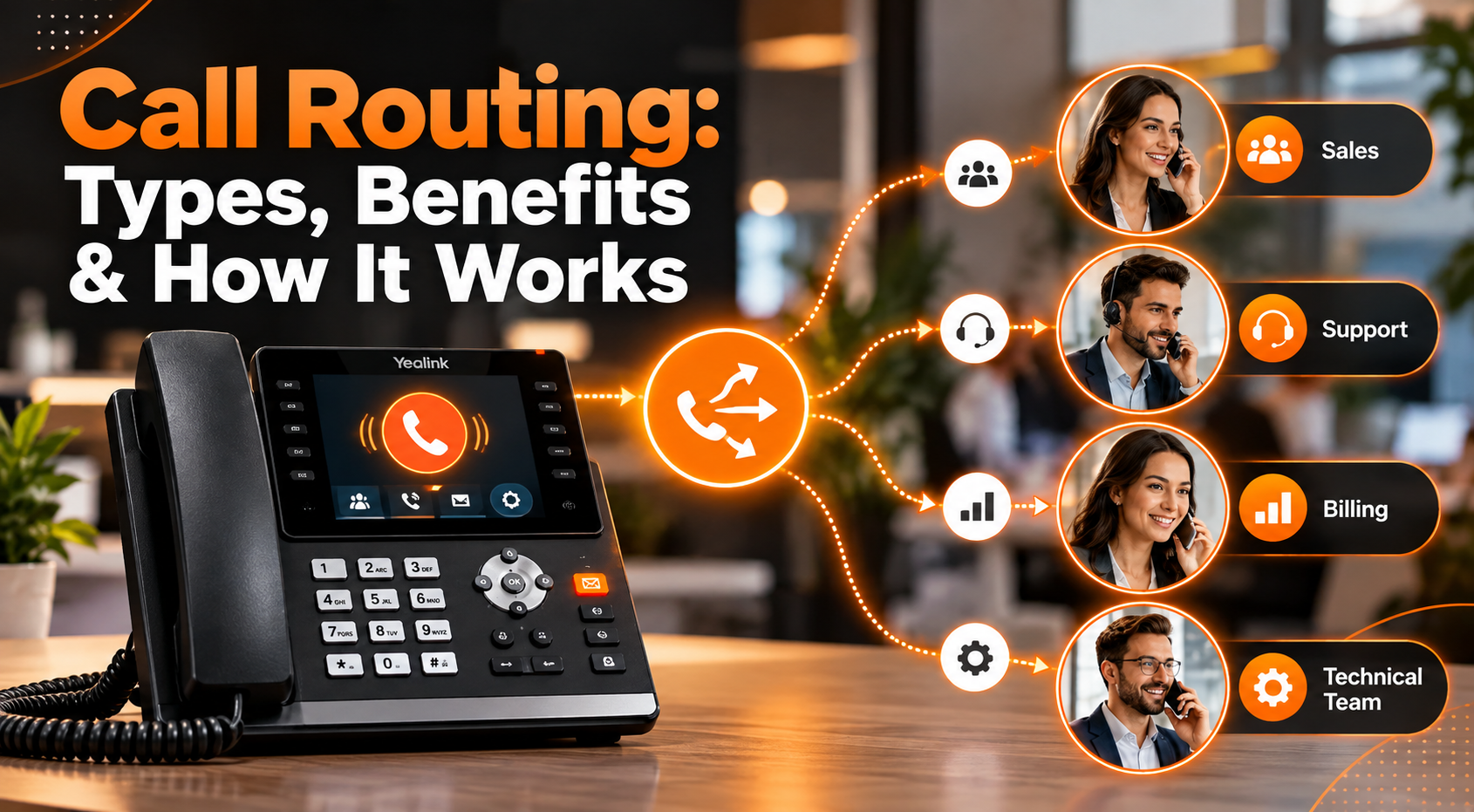
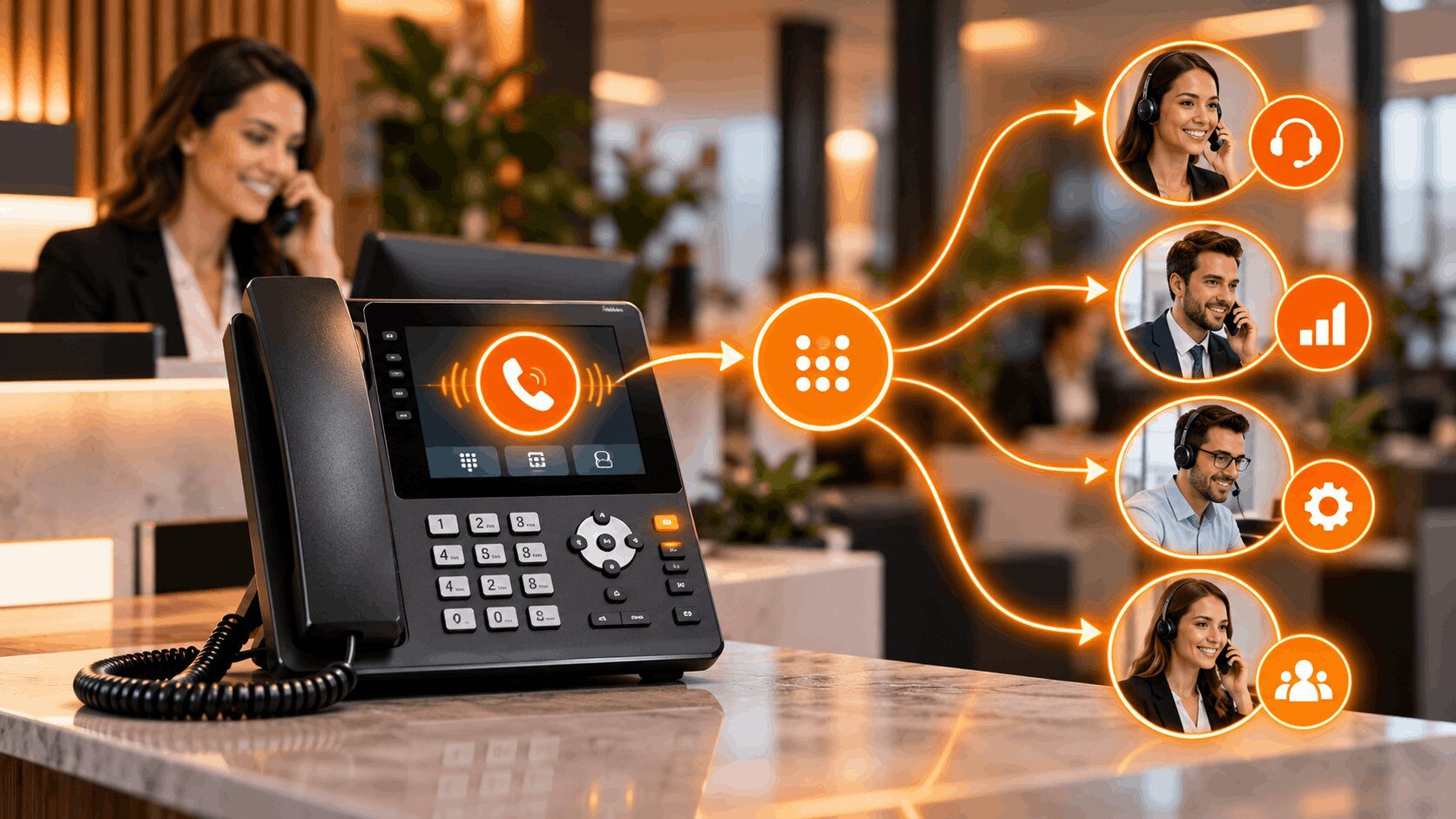
Call routing is an automated process that directs incoming business calls to the right person, department, queue, or device based on predefined rules. Instead of relying on a receptionist to manually transfer every caller, a phone system can identify what the caller needs and determine the most appropriate destination automatically.
Businesses can route calls based on working hours, agent availability, caller location, language, department, skills, or customer information. The result is a smoother experience for callers and more efficient use of your team.
Modern call routing software is useful for more than large contact centers. Small businesses, distributed teams, sales departments, healthcare practices, professional services firms, and multi-location organizations can all use automated routing to reduce missed calls and unnecessary transfers.
What Is Call Routing?
Call routing is the process of automatically directing incoming phone calls to the most appropriate destination according to a set of predefined rules.
The destination might be:
An individual employee
A sales or support department
A call queue
A specific office or location
A mobile or remote employee
Voicemail
An automated answering system
For example, a customer who selects « technical support » from an Interactive Voice Response (IVR) menu can be sent directly to a support queue rather than speaking with reception first.
Phone call routing can also happen without caller input. The system may use the caller’s phone number, business hours, agent availability, location, CRM information, or other criteria to determine where the call should go. This makes routing especially valuable for businesses receiving calls across multiple teams, locations, or time zones.
How Does Call Routing Work?
A typical call routing process can be divided into four stages.
1. The System Identifies the Call
When an inbound call arrives, the phone system collects available information about it.
This may include:
The number being called
Caller ID
Time and day
Caller location
Existing customer information
Previous interactions
If your phone system is integrated with a CRM, existing customer data can also help determine how the call should be handled.
2. The Caller Is Qualified
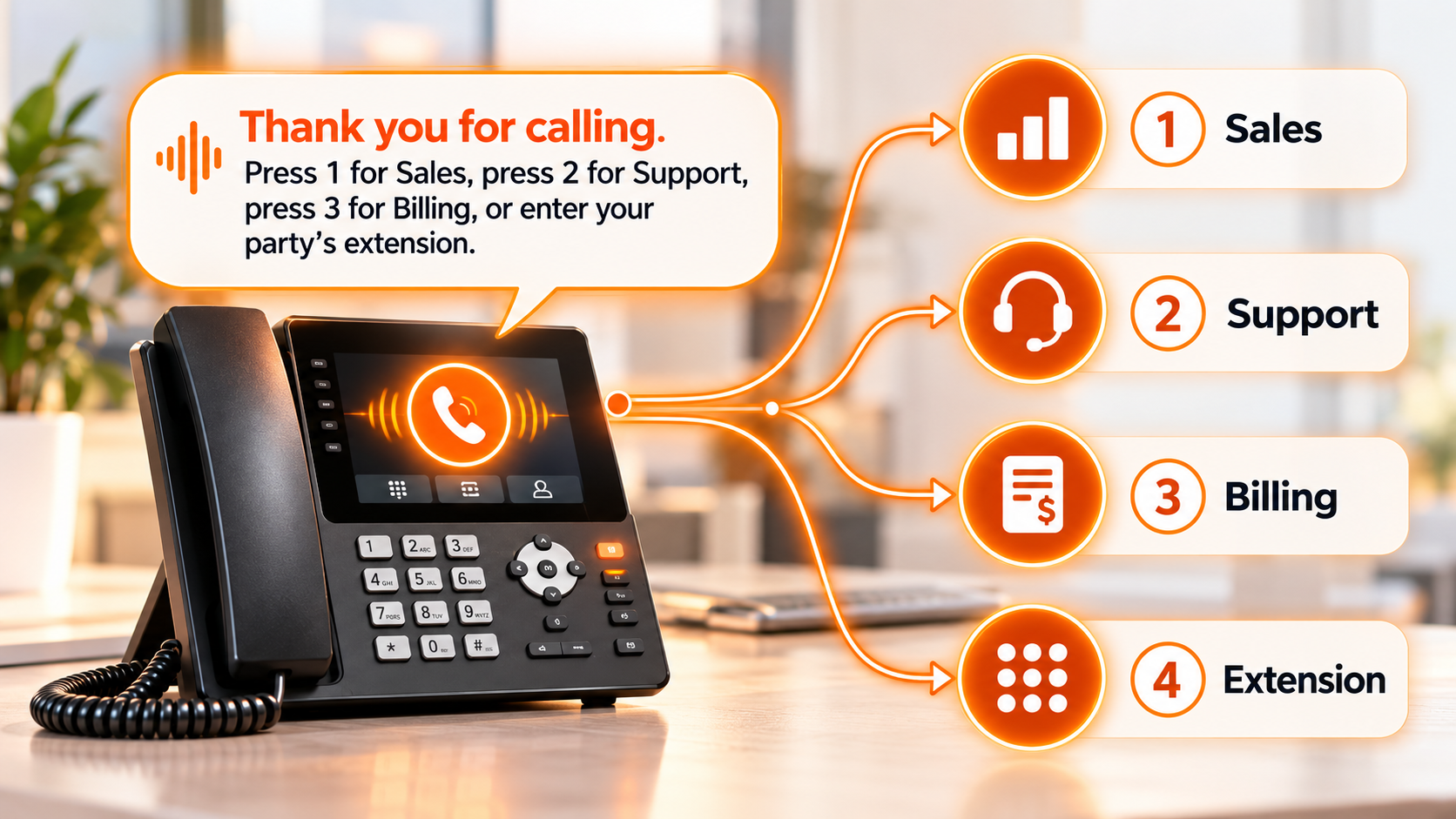
An auto-attendant or IVR can ask callers what they need and guide them to the appropriate destination. For example, callers may be prompted to press 1 for sales, 2 for customer support, or 3 for billing. Based on their selection, the system identifies the caller’s intent and chooses the appropriate routing path.
More advanced call routing systems can also combine IVR responses with customer records, language preferences, agent skills, availability, and other data to connect callers with the most suitable person or department.
3. Routing Rules Are Applied
The phone system evaluates the information against your configured rules.
For example, a company could create a rule that sends:
New sales inquiries to the sales team
Existing customers to account support
French-speaking callers to bilingual employees
Calls after 5 p.m. to an after-hours team
High-value accounts to a priority queue
The system then determines which destination is eligible to receive the call.
4. The Call Is Distributed
Finally, the call is connected to the appropriate employee, team, queue, device, or alternative destination. If the first destination is unavailable, additional rules can redirect the caller to another employee, mobile device, office, voicemail box, or callback option.
The entire process can happen within seconds.
What Are the Main Types of Call Routing?
There is no single routing strategy that works for every business. Most organizations combine several methods depending on their teams and call volumes.
1. Sequential Routing
Sequential, or fixed-order, routing sends incoming calls through a predefined list of employees in a specific sequence. For example, a call may first go to Sales Rep A, then move to Sales Rep B, and finally to Sales Rep C if the previous person does not answer.
This approach is useful when certain employees should receive calls before others, such as senior representatives, account owners, or team leads.
2. Round-Robin Routing
Round-robin routing rotates incoming calls between available employees.
If Agent A receives the first call, Agent B receives the next, followed by Agent C. The sequence then starts again.
This method helps distribute calls more evenly across a team.
3. Simultaneous Routing
Simultaneous routing rings several phones or devices at the same time. The first available person to answer receives the call. It can be useful for small sales or service teams where answering quickly is more important than directing the call to a particular employee.
4. Skills-Based Routing
Skills-based routing connects callers with employees who have the expertise required to handle their inquiry.
Rules may consider:
Product knowledge
Technical expertise
Language
Certifications
Department
Customer type
For example, a Spanish-speaking customer with a technical problem could be routed directly to an available Spanish-speaking technical support representative.
5. Time-Based Routing
Time-based rules determine where calls go based on the hour, day, holiday schedule, or business opening times.
A business might send calls to its New York office during the day and another location after the New York team finishes work.
It can also automatically direct after-hours calls to voicemail, an answering service, or an available remote team.
6. Geographic Routing
Geographic routing directs callers according to their location. A multi-location company could route customers to their closest branch, while an international business could send callers to a team serving their specific country or region.
7. Priority Routing
Priority routing moves selected callers ahead of standard calls according to predefined business rules. An organization might prioritize urgent requests, important accounts, existing customers, or high-value sales opportunities.
8. Find Me/Follow Me Routing
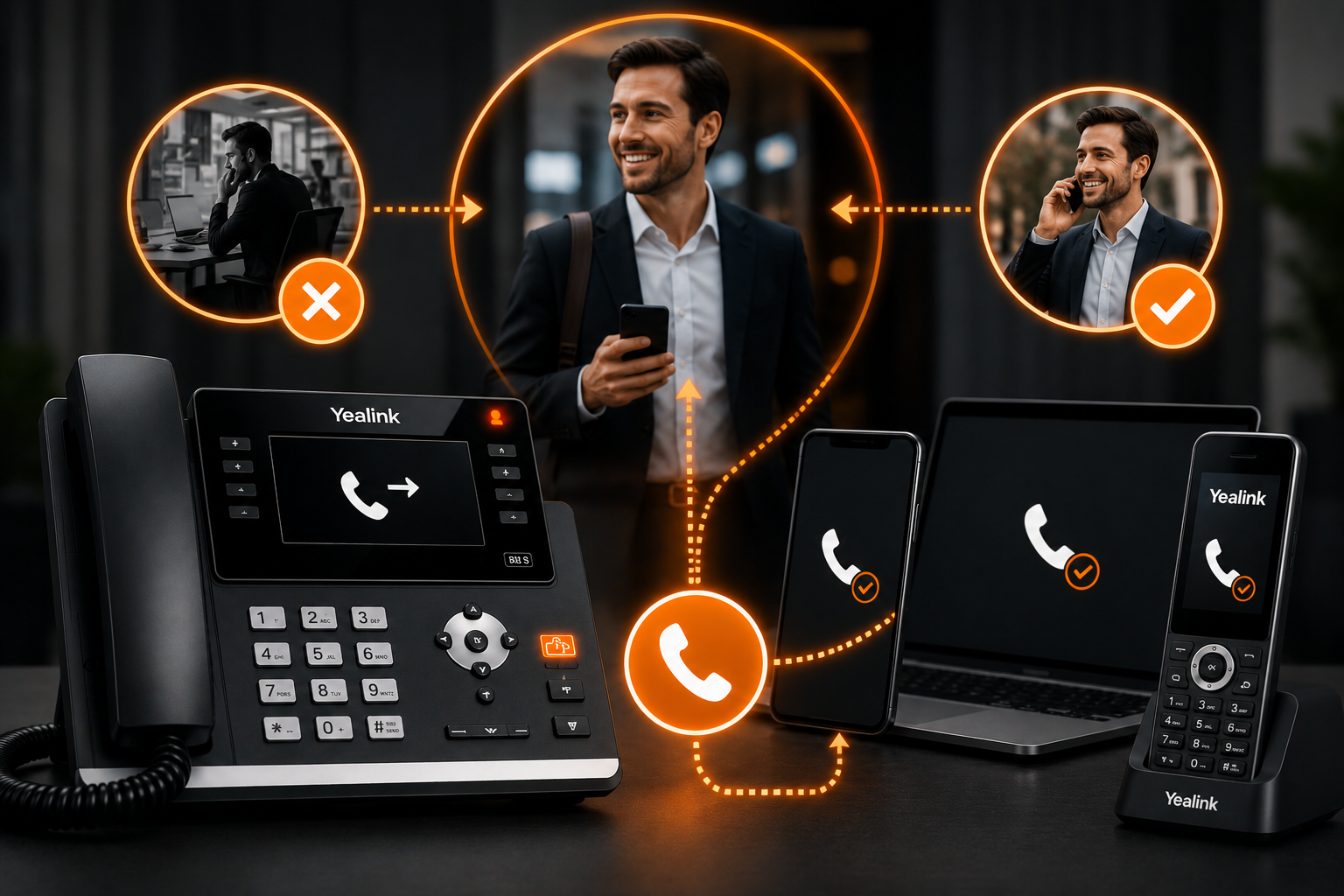
This type of routing allows calls to follow employees across different devices and locations. For example, an incoming call may first ring a desk phone, then move to a mobile phone, another team member, and finally voicemail if no one is available.
It is especially useful for remote employees, field staff, real estate agents, and teams that frequently work away from a fixed desk.
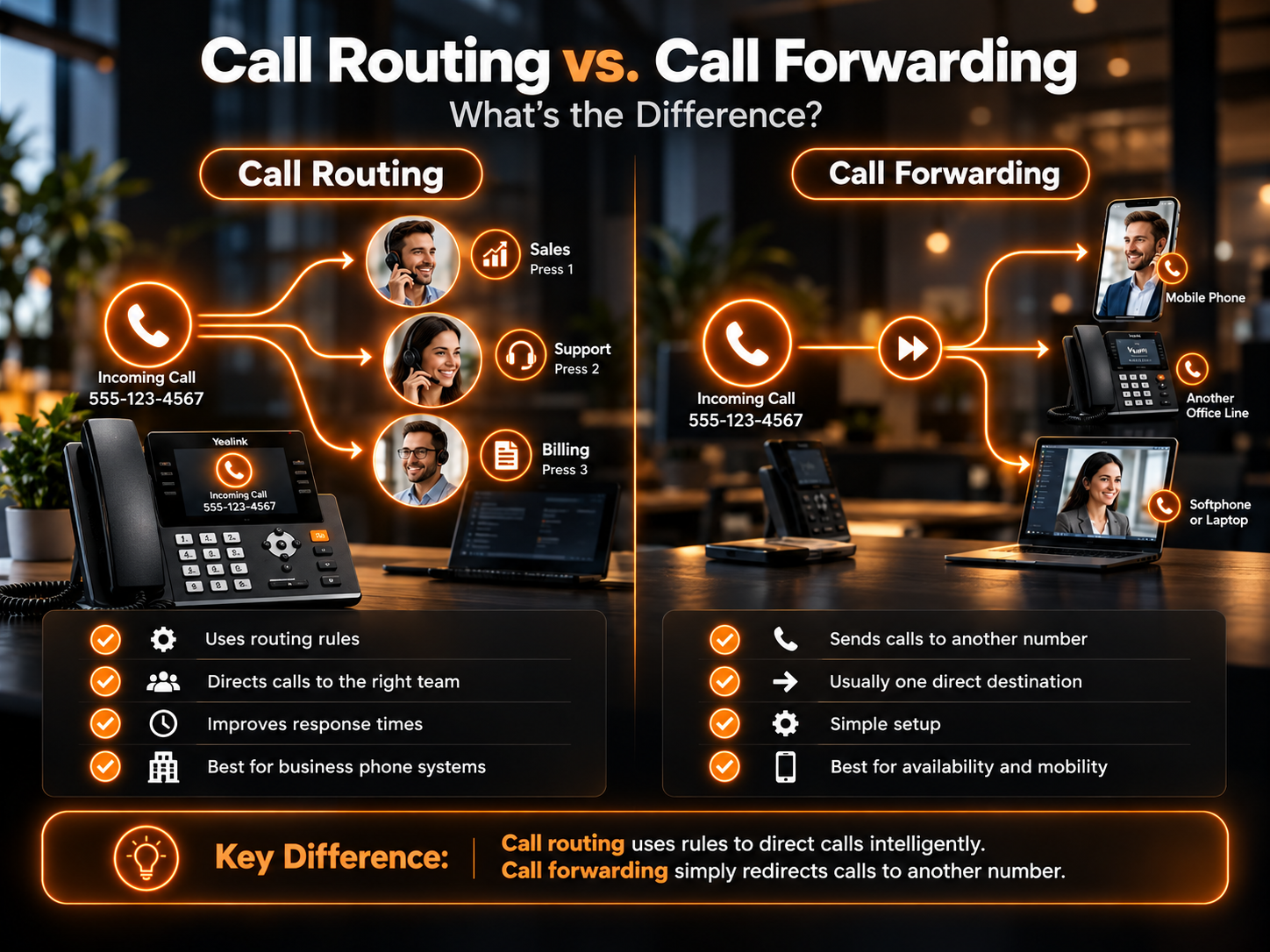
Call Routing vs. Call Forwarding: What’s the Difference?
Although both features redirect calls, they serve different purposes.
Feature
Call Routing
Call Forwarding
Main purpose
Selects the best destination using rules
Redirects calls to another number
Decision making
Can use multiple conditions
Usually follows a simple forwarding rule
Destinations
Agents, queues, departments, locations or devices
Usually another phone number or device
IVR integration
Yes
Usually not required
Skills-based distribution
Possible
No
Time-based rules
Possible
Basic scheduling may be available
Best suited for
Business-wide call management
Simple call redirection
In simple terms, call forwarding redirects a call, while call routing determines where the call should go.
What Are the Benefits of Call Routing?
A well-designed routing strategy can improve both customer experience and internal efficiency.
Reduce Caller Wait Times
Automatically connecting customers to an appropriate available employee reduces unnecessary holding and manual transfers. This can be particularly important for high-volume sales and customer service teams.
Reduce Missed Calls
Calls do not have to depend on one person being available. If an employee cannot answer, routing rules can move the caller to another team member, queue, mobile device, or alternative destination.
Improve First-Call Resolution
Customers are more likely to resolve their issue during the first conversation when they reach someone with the right expertise.
Skills-based and department-based routing are particularly useful for reducing unnecessary transfers.
Balance Employee Workloads
Round-robin and availability-based routing prevent the same employees from receiving every call while others remain underused. A more balanced distribution can make busy periods easier to manage.
Support Remote and Multi-Location Teams
Virtual call routing allows calls to reach employees regardless of whether they work from headquarters, another office, home, or a mobile device. Businesses can therefore maintain one professional phone presence while employees work from different locations.
Create a More Consistent Customer Experience
Customers should not need to understand your organizational structure to find the right person.
Effective routing creates a predictable path from the initial call to the employee capable of helping them.
How to Create an Effective Call Routing Strategy?
Start by mapping why customers call your business and where each type of inquiry should go.
Keep the initial IVR menu simple. Too many choices can slow callers down instead of helping them.
Next, define rules for situations such as:
Business hours: Decide what happens before opening, after closing, on weekends, and during holidays.
Busy periods: Create overflow rules so unanswered calls move to another available person or queue.
Specialized inquiries: Route technical, billing, sales, and other specialist requests to employees with the right knowledge.
Remote employees: Decide which devices should ring and in what order.
Multiple locations: Determine whether calls should be distributed geographically or through a centralized team.
What Should You Look for in Call Routing Software?
The best solution depends on your organization, but effective call routing software should make routing rules easy to configure and update as your business changes.
Useful capabilities include IVR menus, automatic call distribution, queues, skills-based rules, time-of-day routing, geographic routing, mobile and desktop support, CRM integration, voicemail, analytics, and failover options.
Cloud-based systems are particularly useful for businesses with remote employees or multiple offices because calls are not tied to a single physical phone system.
The goal is not to build the most complicated routing structure possible. It is to create the shortest reliable path between each caller and the person who can help them.
How VoxSun Supports Smarter Business Call Routing?
VoxSun combines business communications, IVR, queues, automatic call distribution, and advanced routing capabilities within its cloud phone platform.
Businesses can build routing flows around factors such as departments, agent skills, geography, business hours, customer information, and employee availability. Teams can also receive business calls across desk phones, computers, and mobile devices.
For contact centers and growing organizations, routing can work alongside call analytics, CRM integrations, queue management, and automated workflows so businesses can continually improve how calls are handled.
The result is a phone system designed to help incoming calls reach the right destination with fewer unnecessary transfers and less manual intervention.
Frequently Asked Questions About Call Routing
What is virtual call routing?
Virtual call routing uses a cloud-based phone system to direct calls without requiring employees to be connected to one physical office phone system. Calls can be routed to desk phones, computers, mobile devices, remote employees, or different business locations.
Is call routing the same as an IVR?
No. An IVR collects information from callers through spoken or keypad selections. Call routing uses that information, along with other rules, to determine where the call should be sent. IVR is therefore one component that can support a broader routing strategy.
Can small businesses use call routing?
Yes. Small businesses can use routing to send calls to sales, support, mobile employees, or voicemail without hiring someone to manually answer and transfer every call. Even a simple IVR and after-hours routing setup can make call handling more efficient.
Can calls be routed after business hours?
Yes. Time-based rules can automatically change call destinations outside normal operating hours. Calls might be sent to an after-hours employee, another office, an AI answering system, or voicemail depending on how the business configures its phone system.
When customers call a business, they usually want to reach the right person quickly without being transferred from one employee to another. An auto attendant helps make that possible.
An auto attendant is an automated phone system that answers incoming calls and directs callers to the appropriate department, extension, queue, or voicemail using a predefined menu. It acts as a digital receptionist, helping businesses organize inbound calls without requiring an employee to manually answer and transfer every call.
In this post, we’ll explore what an auto attendant is, how it works, and how it helps streamline business call handling.
What Is an Auto Attendant?
An auto attendant is an automated call-handling feature that greets callers and presents them with options for reaching the right destination.
You have probably interacted with one many times.
A typical greeting might say:
Once the caller makes a selection, the system follows predefined routing rules and transfers the call to the appropriate department, extension, call queue, mobile number, or voicemail box.
Auto attendants are commonly included in modern business phone platforms and are sometimes referred to as:
Virtual receptionists
Automated receptionists
Phone menus
Call trees
Automated answering systems
They are particularly useful for organizations that receive calls for multiple employees, departments, or locations.
How Does an Auto Attendant Work?
An auto attendant follows a structured call flow created by the business administrator.
The basic process usually works like this:
A customer calls the company’s main phone number.
The auto attendant answers the call.
A recorded greeting provides menu options.
The caller selects an option using their keypad or, depending on the system, voice input.
The system matches that selection with a routing rule.
The call is sent to a department, extension, queue, voicemail box, or another destination.
For example, someone selecting “Sales” may be transferred to a sales ring group, while someone choosing “Support” may enter a customer service queue.
Modern business phone system platforms can combine auto attendants with extensions, IVR, call routing, voicemail, analytics, and other communication features within the same system.
Key Features of an Auto Attendant
Although features vary between providers, most modern auto attendant systems include several core capabilities.
Custom Greetings
Businesses can create recorded greetings that welcome callers and explain the available options.
Greetings can also communicate temporary information such as holiday schedules, service interruptions, or changes in opening hours.
Department and Extension Routing
Calls can be transferred directly to individual employees or departments such as:
Sales
Support
Billing
Human Resources
Reception
This reduces the number of manual transfers required.
Multi-Level Menus
A multi-level auto attendant allows businesses to create submenus.
For example:
Press 1 for Sales
Then:
Press 1 for new customers
Press 2 for existing customers
Press 3 for account management
Multi-level menus are useful for larger organizations, although they should remain simple enough that callers do not become frustrated.
Call Queues
If several callers need the same department, calls can be placed into a queue until an available employee answers.
Business Hours Routing
Different call flows can automatically activate according to office hours, weekends, or holidays.
Voicemail and Call Forwarding
If nobody is available, calls can be sent to voicemail or forwarded to another extension, mobile number, or external line.
Multi-Location Routing
Companies with several offices can use one main number while routing callers to different locations based on menu selections or other rules.
What Is a Virtual Auto Attendant?
A virtual auto attendant is a cloud-based version of an automated receptionist that operates through a hosted or VoIP phone system.
Instead of relying on telephone equipment installed entirely inside one office, the call-routing logic is managed through cloud infrastructure.
Administrators can usually configure call menus, extensions, business hours, and routing rules through an online dashboard.
A virtual auto attendant can be useful for businesses with:
Remote employees
Hybrid teams
Multiple offices
Mobile employees
Distributed customer service teams
Because routing is not tied to a single physical office, calls can be sent to employees wherever they are configured to receive business calls.
What Are the Benefits of an Auto Attendant?
Understanding what auto attendant technology is easier when you look at the operational problems it solves.
Faster Call Routing
Callers can select the department they need instead of waiting for someone to answer and manually transfer them. This can shorten the path between the initial call and the appropriate employee.
Less Routine Work for Employees
Receptionists and other employees do not need to spend as much time answering calls that simply need to be redirected. They can focus on conversations that actually require human assistance.
Consistent Call Handling
Every caller receives the same structured greeting and routing options. This helps businesses maintain a consistent phone experience regardless of call volume.
Better After-Hours Coverage
An auto attendant can continue answering calls when employees are unavailable. It can provide opening hours, route urgent calls, offer voicemail, or direct callers to alternative contact options.
Easier Scaling
Adding a new employee or department does not necessarily require redesigning the entire phone system. Businesses can update routing rules and menu options as the organization changes.
A More Organized Caller Experience
A clear phone menu gives callers an immediate understanding of where they should go. The benefit depends heavily on how well the menu is designed. A complicated phone tree can create frustration instead of reducing it.
Auto Attendant vs IVR
Auto attendants and Interactive Voice Response systems are related, but they are not exactly the same.
Auto Attendant
IVR
Primarily routes calls
Handles more complex interactions
Uses menu selections
Can collect caller information
Connects callers to destinations
Can complete automated tasks
Best for straightforward navigation
Better suited to advanced self-service
An auto attendant might say:
“Press 1 for Billing.”
An IVR system might ask:
“Enter your account number to hear your current balance.”
The auto attendant primarily determines where the call should go. IVR can interact with databases or applications to complete more advanced tasks.
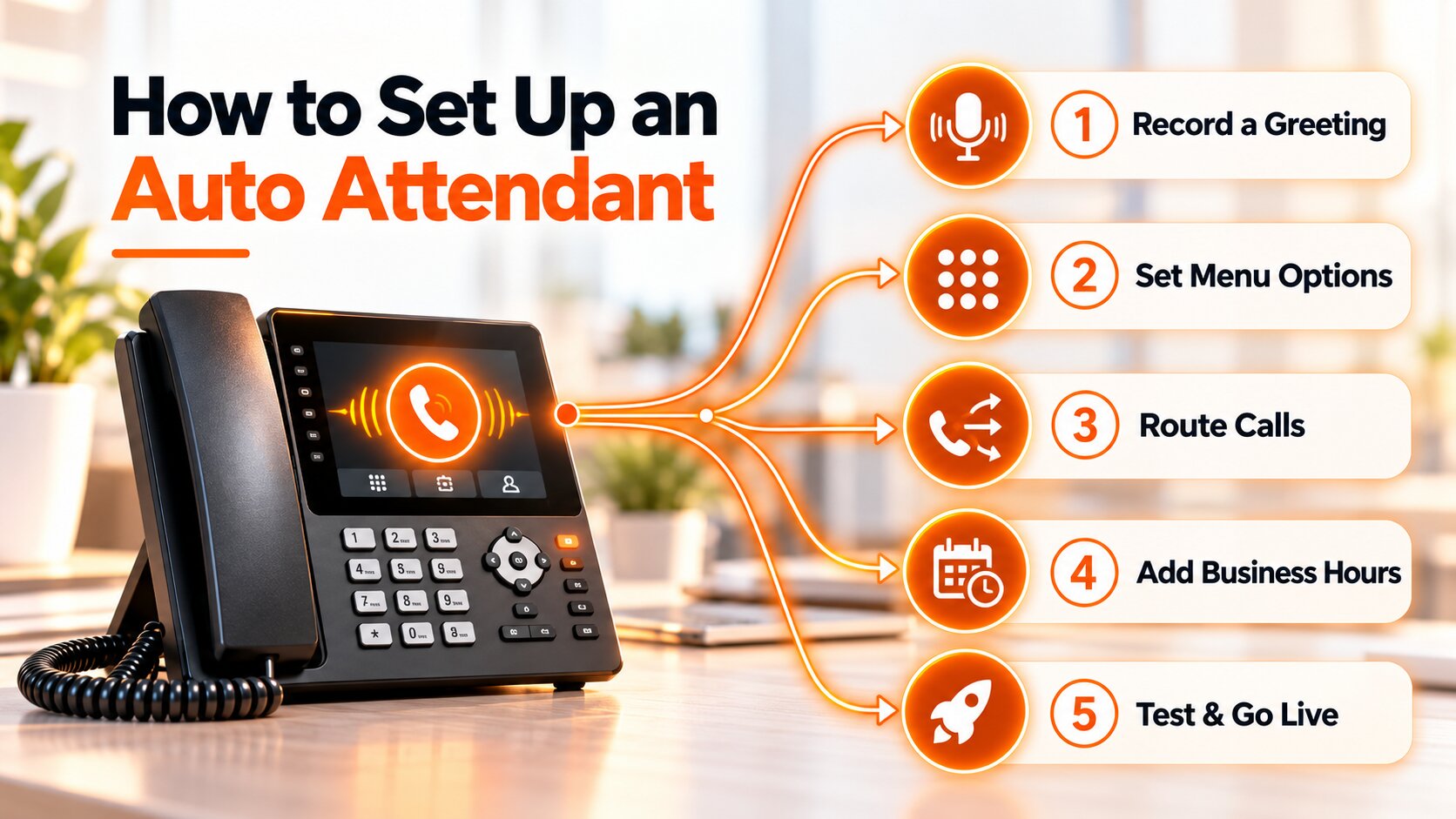
How to Set Up an Auto Attendant?
A good auto attendant starts with understanding why customers call your business.
1.Identify Common Call Reasons
Review the most frequent reasons people contact you.
Typical categories include:
Sales
Customer support
Billing
Appointments
Account management
These should guide your main menu.
2.Map Your Call Flow
Decide where each option should lead. Think through what happens if the selected employee or department does not answer.
3. Keep the Main Menu Simple
Avoid giving callers too many choices at once. Start with the most important departments and use submenus only where necessary.
4. Write Clear Greetings
Use short, direct instructions. Instead of lengthy explanations, tell callers exactly what each option does.
5. Configure Business Hours
Create separate routing for normal hours, evenings, weekends, and holidays.
6. Add Failover Rules
Decide where calls should go if nobody answers. Possible destinations include:
Another employee
Another department
A call queue
Voicemail
An external number
7. Test Every Call Path
Call the system as if you were a customer. Test every menu option, extension, voicemail destination, after-hours route, and backup rule.
Best Practices for Auto Attendant
A technically working auto attendant can still create a poor caller experience if the menu is badly designed.
Follow these principles:
Keep menus short.
Prioritize common departments.
Use clear, simple language.
Avoid long greetings.
Offer a human option.
Remove outdated extensions.
Update routing after team changes.
Set after-hours rules.
Test the system regularly.
The goal is not to automate every interaction. It is to make it easier for callers to reach the right destination.
Common Auto Attendant Mistakes
Too Many Menu Options: Long menus force callers to remember too much information.
Long Greetings: Callers usually want to reach someone, not listen to an extended introduction.
Outdated Extensions: Sending people to employees who have changed roles or left the company creates unnecessary frustration.
No After-Hours Routing: A daytime call flow should not continue sending calls to empty offices at night.
Too Many Menu Levels: Requiring callers to navigate several submenus can make a phone system difficult to use.
No Backup Destination: Every call path should have a clear outcome when the primary destination does not answer.
How AI Changes the Traditional Auto Attendant?
Traditional auto attendants follow predefined rules. A caller chooses an option, and the system follows the programmed path.
AI-based voice technology can extend this model by supporting more conversational interactions. Instead of requiring every caller to navigate fixed menu options, an AI system may be able to understand what someone is asking and determine an appropriate action.
For example, an AI voice system could potentially answer questions, qualify a caller, schedule an appointment, transfer the conversation, or update connected business software.
VoxSun’s AI Voice Agents, for example, are designed to qualify opportunities, book appointments, and update connected CRM systems.
AI does not make the traditional auto attendant irrelevant. Businesses may use both depending on the complexity of the call and the customer journey.
Is an Auto Attendant Right for Your Business?
An auto attendant is particularly useful when manually answering and redirecting every inbound call becomes inefficient.
It may be a good fit if your organization:
Receives frequent incoming calls
Has multiple departments
Operates across several locations
Uses remote or hybrid teams
Needs after-hours call handling
Wants to reduce manual call transfers
Small businesses can benefit from a simple menu, while larger organizations may require multi-level routing, queues, business-hour rules, and advanced integrations.
The most effective system is not necessarily the one with the most menu options. It is the one that helps callers reach the right destination with the fewest unnecessary steps.
Frequently Asked Questions
Can an auto attendant route calls after business hours?
Yes. Auto attendants can use schedules to activate different greetings and routing rules during evenings, weekends, holidays, or other periods when the office is closed.
Can an auto attendant transfer calls to mobile phones?
Many cloud-based systems can forward calls to mobile phones or external numbers when configured to do so. Available routing options depend on the phone provider and system setup.
Do cloud phone systems include auto attendant features?
Many cloud business phone systems include auto attendant functionality, although the available features vary. Businesses should compare capabilities such as multi-level menus, business-hour routing, voicemail, queues, mobile forwarding, CRM integrations, analytics, and administrative controls before choosing a system.
What is the difference between an auto attendant and live receptionist?
An auto attendant uses predefined call-routing rules to direct callers to the right department, extension, or voicemail, making it ideal for routine and after-hours call handling.
A live receptionist provides a more personal experience and can respond to complex or unexpected requests using human judgment.
Many businesses use both, with the auto attendant handling basic routing and a receptionist stepping in when callers need personalized assistance.
In today’s global American business world, companies often struggle with the high cost of international calls, which can quickly add up. At the same time, businesses need reliable communication with clients, suppliers, and colleagues around the world. So how can companies balance these two realities? International phone numbers offered through a cloud phone system provide a promising solution.
Understanding International Calling Costs
International calling fees are primarily the costs associated with placing calls outside the United States. These costs can vary depending on several factors, including the destination country and your telecommunications service plan. High prices are often linked to the infrastructure required to route calls across international networks, especially without a modern VoIP phone system.
The Solution — International Phone Numbers
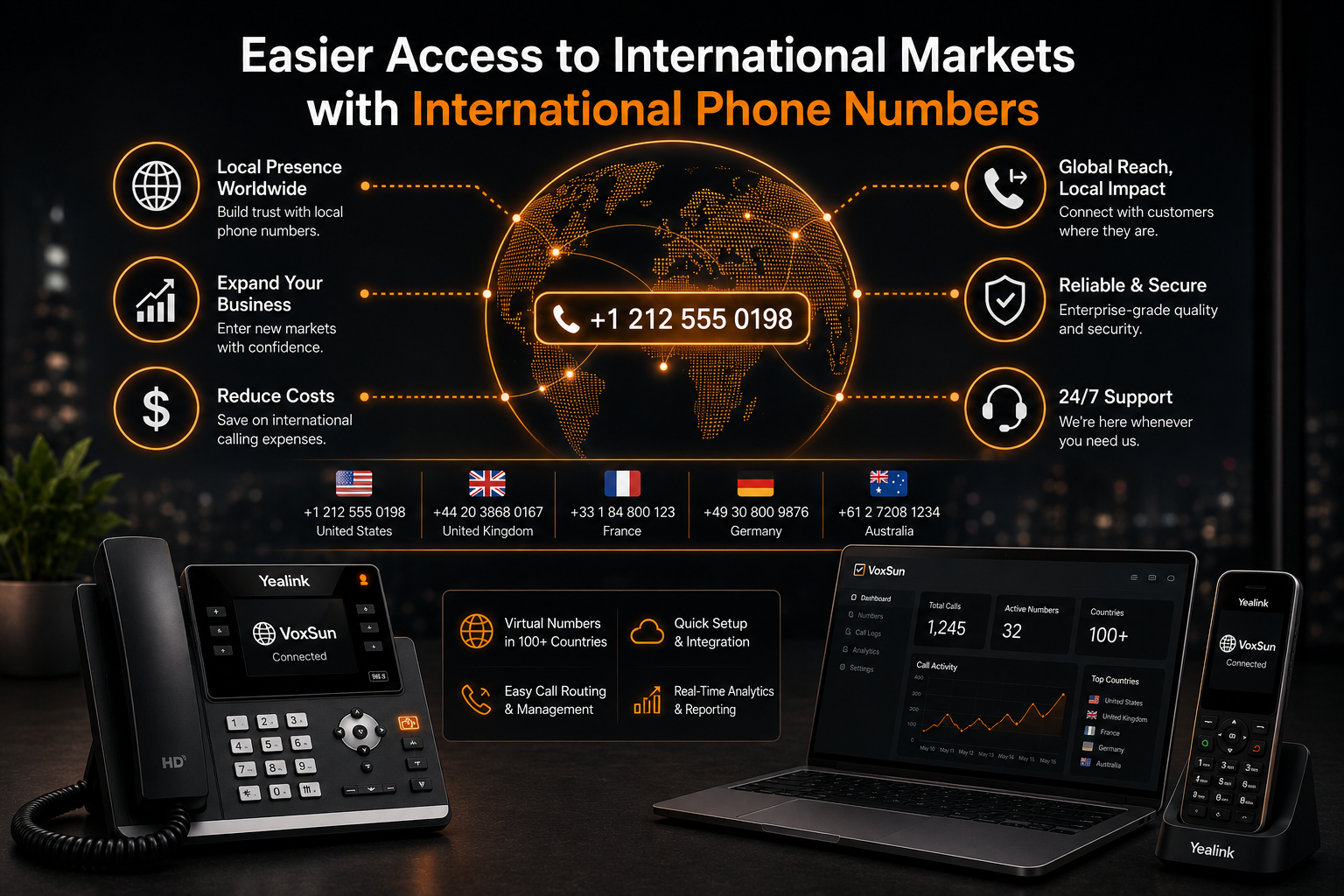
An international phone number allows callers in another country to reach you by dialing a local number. In other words, this type of number simplifies communication with international partners by allowing them to contact you at local calling rates through a cloud-based communications platform.
This not only helps strengthen business relationships but can also significantly help American businesses reduce business phone costs.
A Closer Look at VoIP and International Phone Numbers
VoIP phone system technology, or Voice over Internet Protocol, allows calls to be made over the internet instead of traditional telephone lines. By combining cloud communications with international phone numbers, businesses can reduce international calling costs even further while benefiting from exceptional call quality and reliable business VoIP.
The Benefits of a Business Phone System
Integrating a business phone system into your organization offers many advantages. With this type of system, you can optimize communications, improve company productivity, and reduce exposure to expensive international calling fees. Features such as call forwarding, conference calling, multi-device calling, and voicemail to email make communication more efficient for modern American businesses.
Introducing VoxSun — A Leading VoIP and International Phone Number Provider
VoxSun is a recognized VoIP service provider, specializing in premium hosted VoIP solution services and international phone numbers. Known for its exceptional customer service and innovative approach, VoxSun is an attractive solution for businesses looking to optimize their communication expenses through a cloud phone system.
How to Save on International Calling Costs with VoxSun
VoxSun provides a simple and effective way to reduce international calling costs. By choosing VoxSun services, American businesses gain access to a wide selection of international phone numbers and VoIP solutions designed to lower communication expenses while supporting remote work communication tools and secure cloud communications.
Conclusion
Using international phone numbers combined with VoIP phone system technology is an effective way to minimize international calling costs while improving communication efficiency. If your American business is ready to modernize its communications and reduce expenses, VoxSun could be the ideal solution.
Are international calling costs hurting your business budget? VoxSun can help! Get a free analysis to set up international phone numbers, reduce overseas calling expenses, improve global communication, and keep your business connected worldwide with a trusted business VoIP provider.
In a world where responsiveness defines professionalism and performance, missing phone calls can quickly become a serious issue for American businesses, harming their image and reducing productivity. Fortunately, modern technology offers effective solutions to address this challenge. VoxSun, a trusted VoIP service provider, offers a powerful feature called FollowMe that helps businesses stop missing calls through a modern business phone system.
What Is VoIP?
VoIP phone system technology (Voice over IP) allows voice communication to travel over the internet, similar to traditional phone calls. One of its key advantages is flexibility: you can make and receive calls from anywhere, as long as you have an internet connection through a cloud phone system.
This flexibility is especially valuable in a professional environment. IP telephony supports hybrid work, mobility, and service continuity while centralizing call management with cloud communications. This is exactly what VoxSun delivers with its business phone system integrated with a VoIP solution.
VoxSun’s FollowMe Feature
The FollowMe feature from VoxSun is a powerful example of VoIP phone system technology in action. Its goal is simple: no more missed calls. How does it work? FollowMe allows you to set up rules for call forwarding and call routing to multiple devices. For example, a call to your desk phone can automatically be forwarded to your mobile phone using multi-device calling and a business calling app.
Setting up this feature is quick and straightforward. Just update your VoxSun account settings within the cloud-hosted phone system, and you are ready to go.
Benefits of the FollowMe Feature
Using FollowMe provides significant benefits for both employees and businesses. On one hand, it allows employees to work remotely or while traveling without worrying about missing important calls through remote work communication tools. On the other hand, it enhances customer service by guaranteeing that every call receives a fast and reliable response through reliable business VoIP and secure cloud communications.
How VoxSun Stands Out from Other VoIP Providers
VoxSun goes beyond standard VoIP features. Tools like FollowMe clearly demonstrate its commitment to innovation and business-focused solutions. While many VoIP providers offer basic call forwarding, they often lack the level of customization and flexibility that VoxSun provides through a scalable business phone system and enterprise communication system.
Conclusion
For modern American businesses, missing calls is no longer an option. With VoxSun’s FollowMe feature, this challenge becomes easy to overcome. If you want to stay reachable, improve responsiveness, and never miss an opportunity, VoxSun is a solution worth considering through a cloud phone system.
Are missed calls costing your business opportunities and hurting your responsiveness? VoxSun can help! Get a free analysis to activate FollowMe, stay reachable on every device, never miss an important call, and keep your business connected at all times with a trusted business VoIP provider.
There are many reasons why American businesses may want to keep their phone number when switching to a new provider. This is where number porting comes in—a service that allows you to retain your existing phone number when moving to a business cloud phone system.
What Is VoIP?
VoIP phone system (Voice over IP) is a technology that allows you to make phone calls over the internet instead of traditional phone lines. This modern approach offers several advantages, including better sound quality, greater flexibility, and the ability to reduce business phone costs, making it a popular choice for companies looking for a scalable business phone system.
How Does Number Porting Work?
Number porting is a process that can vary slightly from one VoIP service provider to another, but the overall concept remains the same. You provide your new provider with the number you want to keep, and they submit a transfer request to your current provider.
Some numbers may not be eligible for transfer, which is why it is essential to check portability before switching to a cloud-hosted phone system.
How to Switch Providers Without Losing Your Existing Number
The process may seem complex, but it is fairly straightforward once you understand the steps. First, research and choose a new business VoIP provider. Then, provide them with your existing phone number and confirm that it can be transferred.
It is important not to cancel your current service until the transfer is complete, to avoid losing your number while transitioning to a hosted VoIP solution.
How VoxSun Can Help
VoxSun, a trusted VoIP service provider and business VoIP provider, is well-positioned to simplify the number porting process. With a dedicated team of experts and advanced cloud communications technology, VoxSun supports you in transitioning to a new VoIP phone system—without changing your current number. This ensures a smooth upgrade to a professional phone service for business.
Conclusion
When adopting a new business phone system, number porting is a key factor to consider. With the right provider and proper planning, you can enjoy the benefits of a modern cloud phone system while keeping your existing number, ensuring a smooth transition for both you and your customers.
Take the time to research, plan ahead, and make your move to VoIP a success.
Worried about losing your business phone number when switching providers? VoxSun can help! Get a free analysis to transfer your number seamlessly, upgrade to a modern VoIP phone system, and keep your business connected without disruption with a trusted business VoIP provider in America.
In today’s American digital world, strong communication with customers is essential for any business. This is where the efficiency of a business phone system comes into play. In this article, you will discover everything you need to know to improve customer satisfaction with a cloud phone system that enables effective call transfers.
Understanding VoIP Technology
A VoIP phone system (Voice over Internet Protocol) is a technology that allows voice calls to be made over an internet connection without relying on a traditional phone carrier. It offers many advantages for American businesses, including the ability to reduce business phone costs, improved flexibility, and a better customer experience. With a cloud-based communications platform, companies can receive and transfer calls from anywhere, at any time using remote work communication tools.
Why Choose a Phone System with Call Transfer Capabilities?
Customers can become frustrated by long wait times and having to repeat the same information multiple times. A business phone system that enables efficient call routing and call transfers helps eliminate these frustrations and improves overall customer satisfaction. By ensuring that customers are connected to the right department or person the first time, you can significantly enhance their experience with your business.
A Closer Look at Business Phone Systems
A business phone system provides key advantages for companies aiming to maximize customer service. With call routing and transfer functionality, you can direct calls to the appropriate department or individual, reducing the risk of human error and improving the overall customer experience. These features are essential in a professional phone service for business and a scalable business phone system.
VoxSun Cloud Business Telephony: A Perfect Example
VoxSun is a trusted business VoIP provider offering a cloud phone system with a wide range of features designed to improve customer experience, including efficient call transfer. VoxSun allows you to set up call queues for incoming calls and route them to the right destination, reducing wait times and increasing customer satisfaction through reliable business VoIP and secure cloud communications.
How to Set Up a Business Phone System for Call Transfers
When implementing a business phone system, choosing the right VoIP service provider is crucial. Look for a provider like VoxSun with a strong reputation and proven experience. The right system should offer seamless call routing, clear call quality, and an easy-to-use interface within a cloud-hosted phone system.
Conclusion
Customer satisfaction can make or break an American business. A VoIP phone system that efficiently transfers calls can significantly improve the customer experience. By applying the key points discussed in this article, your business will be well-positioned to enhance customer satisfaction with a cloud phone system.
Are your customers getting frustrated with long wait times and poor call routing? VoxSun can help! Get a free analysis to set up efficient call routing, reduce wait times, improve customer experience, and ensure every call reaches the right person the first time with a trusted business VoIP provider and hosted VoIP solution.
In American business, every call is a sales opportunity. Missing a call means missing potential revenue. That is why staying reachable at all times is crucial for growing your business. With IP technology and a business phone system powered by a VoIP phone system, VoxSun helps you stay connected anytime, anywhere through cloud communications.
The Role of VoIP in Total Availability
Voice over IP (VoIP) has transformed the way American businesses communicate by making calls easier, more accessible, and more affordable. VoxSun, a trusted VoIP service provider and business VoIP provider in the USA, provides complete connectivity through a cloud phone system, including features like call forwarding and voicemail to email for a reliable business VoIP experience.
How VoxSun Enables Total Availability for Sales
VoxSun allows call forwarding across all your devices, ensuring you never miss an opportunity with multi-device calling. Whether you are in the office, on the go, or working from home, you can answer customer calls and increase your sales using a business calling app and remote work communication tools.
Additionally, with voicemail to email, even if you miss a call, the message is instantly sent to your inbox so you can respond quickly through a cloud-based communications platform.
Setting Up Total Availability with VoxSun
Let’s look at how an American business can achieve full availability with VoxSun. It is simple: subscribe to a VoxSun plan, configure your call forwarding and voicemail-to-email settings, and you are ready to go with a cloud-hosted phone system. You are now reachable from anywhere with a scalable business phone system.
VoxSun User Testimonials
Many American businesses have already experienced increased sales after choosing to switch to VoIP with VoxSun. Here is what some users say:
“Since we implemented VoxSun, we no longer miss any calls. The more calls we answer, the more we sell. It has truly been a game changer for us.”
VoxSun has helped numerous companies boost their revenue by ensuring they never miss a customer interaction through a professional phone service for business.
Conclusion: Total Availability Drives Sales Growth
In conclusion, the total availability offered by VoxSun is a powerful advantage for boosting your sales. By answering every call, you multiply your opportunities and unlock your full sales potential with a cloud phone system.
Are missed calls holding back your American business growth? VoxSun can help! Get a free analysis to set up call forwarding, stay reachable on any device, capture every opportunity, and turn more conversations into revenue with a hosted VoIP solution and trusted business VoIP provider.